Image
Aug 062011
 

*~°*°~**~°*°~**~°*°~**~°*°~**~°

KittyCatS! ALL-IN-ONE Food & Milk!

*~°*°~**~°*°~**~°*°~**~°*°~**~°

Hi all :)

We’ve heard your suggestions and made some changes to the KittyCatS! Food & Milk =)

FAST FACTS:

* Sim wide and normal food are now in one bowl which can be easily configured to be sim-wide, parcel-wide or range based.

* You now can buy just 1 sim wide food or milk bowl at a time if you like :)

* With the sim wide and parcel settings now available, you now have more freedom in the ranges you set your cats to roam and won’t need to worry about them not eating.

* Single Item bowls no longer come in a package carton, you will now just get the bowl instantly from the vendor into your inventory. This will help in “lost food” issues. (since there are less unpacking stages that way)

* For packs 5 and up, we have made the “packages” smaller so you can use them for your decorating or to put in your SL kitchens or whatever you want :)

SPECIAL NOTE FOR KittyCatS! Auto Feeder Owners:
Since the current Auto Feeders don’t support this new food completely, you will be automatically given a Auto Feeder System as soon as you buy the new food or milk. Please leave the old food in the old server till it runs out. You can setup the new Auto feeder server and mats alongside the old one.

Enjoy!
Your KittyCatS Team

©KittyCatS! all rights reserved.

Jul 292011
 

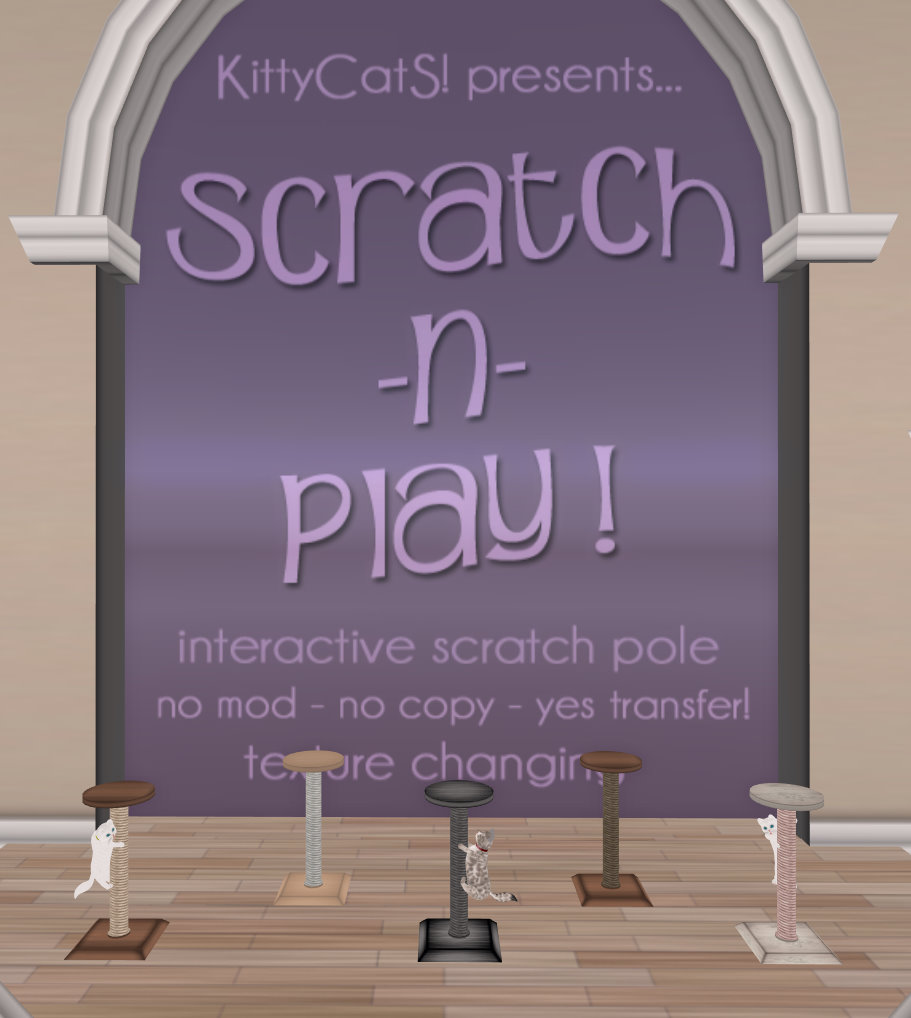
Remember last week when we told you about “Scratch-n-Play”? well… it’s here!

*~°*°~**~°*°~**~°*°~**~°*°~**~°

Presenting “Scratch-n-Play”
an interactive scratching pole from KittyCatS!
with “click to customize” options!

*~°*°~**~°*°~**~°*°~**~°*°~**~°

What is it exactly? An interactive cat scratch pole your KittyCat will LOVE to climb, scratch and play with!
You will see a whole new side of your KittyCat with this fun interactive scratching pole!

FAST FACTS:

• Can all your KittyCatS use it? YES
• Is there a way to change the color to match my home? YES ( there are a few color/wood/scratch rope options)
• Will my cat know it’s there and use it? YES! they have been bugging us to make them!
• IMPORTANT: The Scratch-n-Climb Pole needs to be in range of the cats home, and the cat needs to be allowed to walk to use it.
They will scratch or climb the pole when they feel like it, between their usual daily activities :)
• Posts are no copy, no mod but transferable!

Available NOW in the mainstore… where you can see KittyCatS at play! :)

We really hope you enjoy this… we sure have!

Your KittyCatS Team

©2011 KittyCatS! all rights reserved. All names, titles, and text © KittyCatS! and may not be used without permission.

Jul 232011
 

Hi All! We have updated the Pedigree system and added the new Jewels to the website! Below you’ll find specifics on what was changed. We hope you like the improvements as much as we do! :)

Pedigree

FILTERING:

  • You can now FILTER your pedigree list by selecting specific traits on top.
  • Search for your cats by name in the new search field. (case sensitive)

And ofcourse, all these filtered results can still be sorted as well :)

AND MORE!

  • The NEW WHISKER TRAITS were added too!
  • For KittyCatS living in the Menagerie the pedigree trees will now still show the cats name, and just have a small “Menagerie” tag.
  • Total male & female count added at bottom of list.

JEWELS

  • You will find a new “My Account” Entry in the website menu, showing your KITTY DOLLAR BALANCE & collected JEWELS

(Purchased jewels will show within 24 hours. Make sure to rez them if you received them via a direct inventory transfer so they register and show on your page ).

Enjoy!

Your KittyCatS Team

©2011 KittyCatS!. All rights reserved. All information contained in this post is © KittyCatS! and may not be used without permission.

Jul 192011
 

**************
KittyCatS! Update V1.08
**************

Hello KittyCatS! Owners!

Happy Summer again! Another update??? Oh why oh why??? Well… because we had a few little things we wanted to share with you! Some surprises some you will find out now and some later… also we got rid of a few little fleas :).

NOTE: If this is your first time doing an update with KittyCatS! the process is very simple. Yes, you heard right, VERY simple. (At the bottom of this note are the simple steps on how to update)

Alrighty then… here are the highlights, additions, changes and fixes included in this update.

* HIGHLIGHTS *

* Introducing: Fancy CatS! & KittyCatS! Jewels

KittyCatS! proudly introduces KittyCatS! Jewels & Fancy CatS!. At very random times, your cats will gift you with a rare gemstone… (you will have to wait and see what they are) when you get them you can collect them and when you get the amount needed they will give you a Fancy Cat! Our Fancies will be very special cats that will range from variations on different breed colors ONLY available thru being a “Fancy”! Also… the KittyCatS! Jewels can be traded or sold for those of you who have more than you need. We hope this is fun for you!

* Introducing: Whiskers Whiskers Whiskers!

We’re really excited about adding the new whisker traits! It’s been something we’ve wanted to do for quite some time!
As of now the “default” whiskers are called Silver for color and “Guitar” Shape. Funny shape name huh?
As a little bonus we added a different hidden trait in the update (the same for all) which basically means YOUR CATS CAN HAVE OFFSPRING WITH A DIFFERENT SHAPED/COLORED WHISKER as SOON as you breed them! You won’t have to wait for your new babies to grow for this trait to show up! Even more new Whiskers to discover can be found in the new starters! Enjoy!

* ADDITIONS *

* Fully configurable On/Off floating text settings for your boxes! Including all traits, box name and size.
Time to give a more focused and pleasant oversight in your stores!
* Left Shoulder and Cuddle attachment positions are now restored when manually adjusted, reset on owner change, kept on update. So no more readjusting :)
* For KittyCatS HUD owners: HUD display increased from 240 to 275 KittyCatS!

* CHANGES *

* KittyCatS will not walk for 4 minutes after been sent home or teleported to you with the KittyCatS HUD.

* FIXES *

Boxes:
* Identical twins will no longer show as non identical after an update, for boxes born after this update.
* Box rotation will now be kept after an update… Yes, less work for you 😉

Cats:
* Cats will not listen anymore for a new name, partner or range if other buttons got pressed meanwhile in the menu.
(also fixes the problem where a cat for which a partner attempt was initiated , but not finished yet, messed up the partnering that was set from an other cat in the meantime).
* possible fix for some cats ending up with a disproportional head for a short time (Yes, we need your help here, keep reporting the problem if it still occurs!)
* “I love you, avi_name” will now only say the first name.
* Cats which have ” Walk & Run” and “Sit & Lay ” disabled will no longer do funny moves with their head… Oops!

HUD
* Perma-Pets will now also sort on gender.
* Cats will now also sort properly on sleeping when their name contains a symbol.
* Slider texture will now display correct with 50+ cats.
* HUD counter will now show 1-5 instead of 0-5 when 5 or less cats present.
* HUD will show the tool icons when exact 5 KittyCatS are found.

* Coming Soon! *

* Next week : update of the pedigree site to reflect whiskers as well as an overview of your Jewels & some minor adjustments

Also next week… “Scratch and sniff???” NOOOOO it’s SL we can’t smell, how about… Scratch & Climb???
You will find a new fun way to watch your KittyCatS scamper about and well… you will have to wait and see it :)
So be looking for that next week in the store! Your KittyCatS can’t wait to show off for you 😛

So…… That sums up this update! Again, thank you for your continued support, feedback and enthusiasm!
You’re the BEST!

**************
HOW TO UPDATE
**************

In the coming 24 hours your cats will start to show an “UPDATE ME” tag.
As soon as they do, the UPDATE button will be available in your cats menu to obtain an updater.
As of that point, you have 2 weeks to update your cats.
Make sure you have at least 30 prims available when you run the updater.

EASY AS 1,2,3 updating steps:

1. Click the “UPDATE” button in the menu of your cat and it will give you an updater.
2. Rez the Updater
3. Click the “can of Update” and watch it as it updates all your cats and boxes! The updater will give KittyCatS HUD owners a new HUD as well.

No need to move cats, re rez them, group them, travel to sandboxes, pull your hair, or anything! It’s REALLY that easy. :) yay!
All settings for your cat will be kept, including the group. Only if you had a cat or box for sale, you will have to put them for sale again…

Your KittyCatS Team

©2011 KittyCatS!. All rights reserved. All information contained in this notecard is © KittyCatS! and may not be used without permission.

Jul 032011
 

~*~’~*~’~*~’~*~’~*~
KittyCatS! Update V1.07
~*~’~*~’~*~’~*~’~*~

Happy Summer! Once again “thank you” for your input, support and ongoing contributions to our growing community! It’s been great to grow with you and see how you are evolving in creativity, kindness and your ability to have FUN!

It’s update time again! This will be an update focused on “maintenance” with a few surprises that we hope you will enjoy.

NOTE: If this is your first time doing an update with KittyCatS! the process is very simple. Yes, you heard right, VERY simple. (At the bottom of this post are the simple steps on how to update)

HIGHLIGHTS

*Introducing: Pose Me!

KittyCatS! proudly introduces our extended “Pose Me” feature. With “Pose Me” you have now more flexibility and creativity in how you display or photograph your KittyCatS!

With our release you had a little taste of our first “Pose Me” pose, (in the posing on choice) and now you will find 5 new ones!

(We can’t WAIT to see what you do with them!)

*Introducing: Love Drops!

Love Drops will add that last 1% of love so you don’t have to wait what seems like YEARS for your cats to breed! Yes, we heard you :) Love Drops will be available next week in the store!

*Introducing: Happy Vitamins!

No more sad KittyCatS! We will now have Happy Vitamins for those of you who want to give your KittyCat a little boost of joy! They will increase happiness for 5 hours with a certain percentage. Available next week in the store!

ADDITIONS

*What should your KittyCatS say to you…. winning sentences!
*New Sleeping Animation

For KittyCatS HUD owners:

• Sort your kittens by gender, name, age, love, happiness, sleeping, energy and hunger!
• New posing dialog to reflect the cats new”Pose Me” options, including a “randomize” button to set a random pose for each cat with one click.

*Note: the old HUD is not compatible with the updated cats and visa versa.

CHANGES

*Reintroduction of “Home Rotation”. Cats home rotation will be saved when returning cats ‘home”. (if new Home is not zero)
*Online help buttons now lead to registration page if not registered. If registered will show a link to manual, pedigree, forum and support, and SPECIAL LINK TO ACCESS THE SPECIFIC CATS PEDIGREE TREE directly! (works for both boxes & cats)
*A collar that a cat is already wearing can’t be applied a second time.

FIXES

Boxes:
*”Text On/Off” button will now be restored correctly after an update.
* Non-identical twins with identical 1st gene traits but different 2nd genes and gender will now be shown as non-identical.

Cats:
* Partner name with “&” symbol will now properly be stored in our database.
* Workaround for “inventory modified” problem occuring after sim restarts.
* Box birth, Teleport home and hunger message will now also show clickable location links if sim name contains a space.
* Fixed a bug where butterflies could keep emitting.
* Cats which have ” Walk & Run” and “Sit & Lay ” disabled will now be able to play, and cuddle/attach without first enabeling one of the options.

That sums up our second update! Again, thank you for your continued support, feedback and enthusiasm! Enjoy!

~*~’~*~’~*~’~*~’~*~
HOW TO UPDATE
~*~’~*~’~*~’~*~’~*~

In the coming 24 hours your cats will start to show an “UPDATE ME” tag.
As soon as they do, the UPDATE button will be available in your cats menu to obtain an updater.
As of that point, you have 2 weeks to update your cats.
Make sure you have at least 30 prims available when you run the updater.

EASY AS 1,2,3 updating steps:

1. Click the “UPDATE” button in the menu of your cat and it will give you an updater.
2. Rez the Updater
3. Click the “can of Update” and watch it as it updates all your cats and boxes! The updater will give KittyCatS HUD owners a new HUD as well.

No need to move cats, re rez them, group them, travel to sandboxes, pull your hair, or anything! It’s REALLY that easy. :) yay!
All settings for your cat will be kept, including the group. If your cat or kitten box was marked for sale, you will need to re-set it for sale.

Your KittyCatS Team

©2011 KittyCatS!. All rights reserved. All information contained in this notecard is © KittyCatS! and may not be used without permission.

Jun 122011
 

Our new Pedigree site is almost ready for release, so in preparation for that we’re making some changes to the way our customers log in to the forums and the support site.

We’re going to integrate all logins to one username and password. This will be used to login to a portal from which you can access the forums, support site, and pedigree site. Your new login will be your SL name.

Prior to this integration we’re giving customers a chance to keep their current forums settings by ensuring that you are registered on the forums under your SL name. Additionally, if you want your support account history to merge into the new login, please make sure you are using the same email for the new registration as you used for the support site.

If you are not registered on the forums or support system under your SL name, and you need to have it changed, you need to let us know by Tuesday, June 15 either via the support system, a reply to this thread, or a message to Equinox Pinion inworld. If you need to change your forums account name to your SL name, be sure to specifiy what your actual SL avatar name is, the email address you used to register, as well as your current forums and support account names.

After Tuesday, June 15 we’ll begin integration of the new system by sending out a prim to everyone to click to register their avatar key/SL name with the new registration system. More information on that will follow at that time.

If you are not registered for either the forums or the support site, a means of registering under the new system will be provided with our next update.

We’re really excited about these changes and hope you are too! If you have any questions, please do not hesitate to ask! :)

The KittyCatS Team

Apr 222011
 

KittyCatS! Update V1.05

Hello KittyCatS! Owners!

First of all, we’d like to say “thank you” once again for your input, support and on going contributions to our growing community! You make KittyCatS! a lot of fun!

It’s update time again! This will be an update with a few surprises that we hope you will enjoy and of course it will be easy and fun! If this is your first time doing an update with KittyCatS! the process is very simple. Yes, you heard right, VERY simple. (At the bottom of this note are the simple steps on how to update)

Now, here are the highlights, additions, changes and fixes included in this update. Yes we said “HIGHLIGHTS!”

HIGHLIGHTS

Introducing: The Menagerie and our own currency: The Kitty Dollars (K$) !!

The Menagerie is a place where KittyCatS! live and play in bliss forever. When you send a KittyCat (or kitten box) to The Menagerie, you will get in return “Kitty Dollars” (K$) that can be spent at the KittyCatS! store. Each KittyCatS sent in will reward you with K$50, or 50 Kitty Dollars. The age, type or health of cat does not matter, and yes, this means you can send in sick cats as well. The ability to use your Kitty Dollars will be available next week when all our vendors are updated so you can pay with your “KittyCash” or Lindens. In the future we will have exclusive items available only with Kitty Dollars. You can check your “KittyCash” balance on the menu at anytime by clicking on your cat and then clicking “Menagerie”. Exchange rate for the K$ to the L$ is 2.5 :1, which means 2,5 K$ are 1 L$.

Introducing: “Let’s Play!”

A new interaction where you and your KittyCatS can play! Your KittyCatS will run and play with a ball you throw, then bring it back to you! Loads of fun! (*note: the throw animation was made by IsabellaGrace Baroque of Olive Juice)

Introducing: TeaCups & Toys:

Teacup & Toy KittyCatS will be our counterpart for RL Teacup & Toy cats. These are miniature cats, even when they are full grown! The chances on birthing a TeaCup or Toy KittyCat are entirely random. All current KittyCats can give birth to TeaCups or Toys, so no need to buy new starter cats. TeaCups are the smallest and Toys are a bit bigger, but not as big as normal cats. For some pictures & Info about RL Teacups & toys, check: http://www.pictures-of-cats.org/teacup-cats.html
& http://en.wikipedia.org/wiki/Dwarf_cats (toys are mentioned only briefly, but its a common expression in the breeding world.)

ADDITIONS

  • Talk button: turn On/Off your KittyCat’s ability to say things about your shoes & how wonderful you smell…
  • Tool to remove collars available in the store next week at no cost. This means your boy cat wont be saying in the future, ‘Why did you put this girly collar on me?” 0h, hmm if it did, you could always turn of its ability to talk.
  • Boxes broadcast their information to a channel one time when born. This should allow the development of 3rd party tools that detect new boxes. (information can be requested from KittyCats Resident)
  • For KittyCatS HUD owners: Position is now shown in the info output when you click the stats part of the HUD. This is an easy way to teleport to your kitten. (note: fully updated KittyCatS HUD which reflects the new options will be sent out next week to HUD owners.)

CHANGES

  • Character Limit for names is now 50. Existing names longer than 50 characters will be kept.

FIXES

  • Perma-Pets™ will sleep now (oops…)
  • Boxes that are transferred to someone else can now be renamed.
  • Cats will set a new home position when “dropped” on a different sim if they were attached.
  • Appearance for cats which had been sick more than one time is now correct when they are healed or made into Perma-Pets™.
  • Sides of collars fixed.

That sums up our second update! Again, thank you for your continued support, feedback and enthusiasm! Enjoy!

The KittyCatS! Team.
HOW TO UPDATE
In the coming 24 hours your cats will start to show an “UPDATE ME” tag.
As soon as they do, the UPDATE button will be available in your cats menu to obtain an updater.
As of that point, you have 2 weeks to update your cats.
Make sure you have about 30 prims available when you run the updater.

EASY AS 1,2,3 updating steps:

1. Click the “UPDATE” button in the menu of your cat and it will give you an updater.
2. Rez the Updater
3. Click the “can of Update” and watch it as it updates all your cats and boxes!

No need to move cats, re rez them, group them, travel to sandboxes, pull your hair, or anything! It’s REALLY that easy. :) yay!
All settings for your cat will be kept, including the group. Only if you had a cat or box for sale, you will have to put them for sale again…

©2011 KittyCatS!. All rights reserved. All information contained in this notecard is © KittyCatS! and may not be used without permission.

Mar 072011
 

Hi folks! As some of you are aware, we’ve had a problem with the KittyCatS disappearing after being cuddled and detached. The issue is that the KittyCatS either disappear from the inventory completely, or go into the inventory as a “parentless” object where they are below the My Inventory and Library folders.

It’s important to note that this does not affect everyone and that THIS IS AN SL BUG. This is not a bug related to the KittyCatS. It is an issue with how SL can sometimes treat detaching an object which was attached to an avatar with a script. It doesn’t appear to be restricted to a particular viewer either.

We are working hard to try and identify a possible solution for the issue from our end. In the meantime, the best way we’ve found to avoid the detachment issue is to drop the cat instead of detaching:

Instead of detaching, right-click the cat and select “Drop”. Your cat will land in the “cuddle” animation. To reset them, click the cat for the menu, select Animation, and select Jump Home or you can just wait till they move again and reset on their own.

**PLEASE NOTE** You may need to have build rights on the land you are on, and have an active group land tag for Dropping to work!

If for any reason your KittyCat goes missing despite the above workarounds, please file a ticket immediately at our support site: https://kittycats.ws/support/. Be sure to include either your KittyCat’s ID# or their name, if they were partnered, as well as your full avatar name. Staff will replace your missing kitty ASAP.

Thank you!

The KittyCatS! Team