
Hello all! Below is our recap for our Q&A on using the Online Cattery. KittyCatS Q&A sessions are held on the 1st and 3rd Sundays of each month at 11:00AM at the KittyCatS Main Store sim. Our next Q&A will be held on Sunday, April 7th and will be all about using the ticket support system. If you have a suggestion for a future Q&A, please send an IM or notecard to Kitten Longmeadow. 
*******************************************************************************************
Q&A Recap – Using the Online Cattery

So what is the Online Cattery? Well the best way to describe it is that it is an online storage solution for your KittyCatS. Cats that are kept in the Online Cattery require food, can be given vitamins, can be partnered and breed together and give birth to kittens – all while online on our website. It’s great for people that want to have a lot of cats, but don’t have the prim space in world, or for people that like checking on their cats while not logged into Second Life. It’s also an excellent way to store cats and boxes since you can sort your cats by a variety of ways using the Cattery’s sorting feature.
So how do you get to the Cattery? Click on the Cattery tab on the KittyCats website while logged in and you’ll be taken to your Cattery home page which will look similar to this:
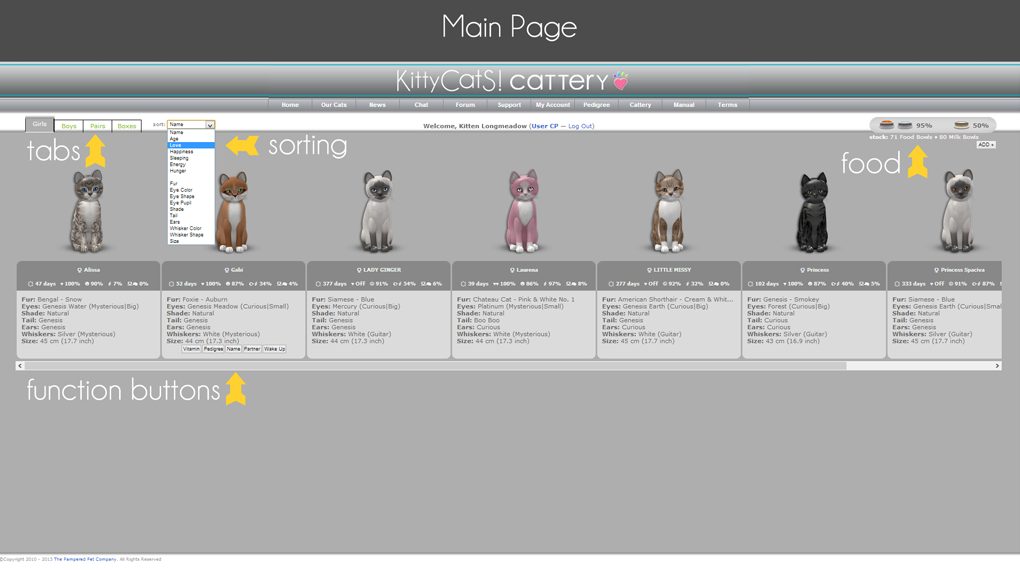
You’ll notice a number of features on the main page right away. At the top left you have your cats divided up onto tabs for Girls, Boys, Pairs & Boxes. Next to that you can see the Sorting drop down menu, which you can use to sort your cats further by criteria like Fur, Eyes, Tails, Name, etc. If you move your mouse cursor over the image of each cat, you’ll see some buttons popup for Vitamins, Pedigree, Name, Partner, and if they’re asleep, Wake Up. Finally up at the top right of the Cattery you’ll see your food & milk. The percentage next to each bowl indicates how much is left in the bowl that the cats are currently eating from, and beneath that you can see how many bowls of food and milk you have in stock.

Underneath the values for the bowls you have in stock is a button that says “ADD+”. This is how you add food to your Online Cattery. You’ll need Kitty Dollars to purchase food and milk in the cattery (more on that below). Click on the ADD+ button and the screen will change to look like so:

Select the food you want to purchase, then click to confirm the purchase. If your purchase is going to dip into your Kitty Dollar Bonus (the K$ you earn from sending cats and boxes to the menagerie) then you will also get a warning. Once you finish confirming the purchase, you’ll see the food added to your reserves at the top right of your screen
Now let’s say you want to give your cat a vitamin in the Cattery. Mouse over the cat that you want to give the vitamin to and click on the Vitamins button when it appears.

Click on that button and the screen will change to show you the Vitamins window and the cat you are applying it to. Select your Vitamin, confirm the purchase, and you should see that the vitamin was successfully applied to the cat.

Now that you’ve got food in the cattery and you’ve given your cats some vitamins, how about partnering them? Mouse over the cat you’d like to partner and select the Partnering button:
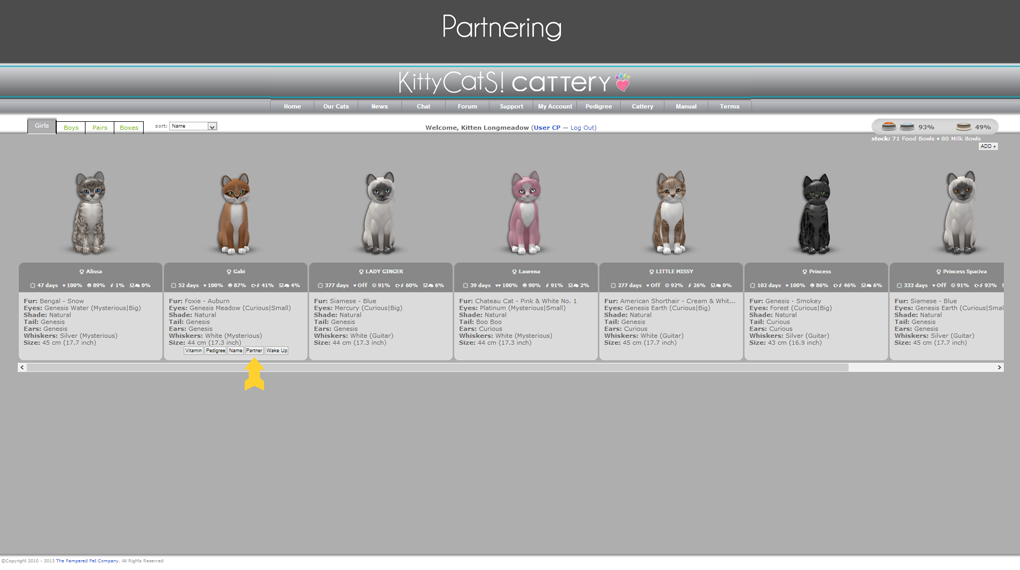
The screen will change to show the cat you selected to partner on the left, and the available partners for the cat on the left. If you have multiple choices for available partners, you’ll be able to scroll through them to choose the one you want. After you select your cat’s partner you’ll be asked to confirm the partnership and select if it’s a one-time partnership or if they’ll be auto-repartnered.
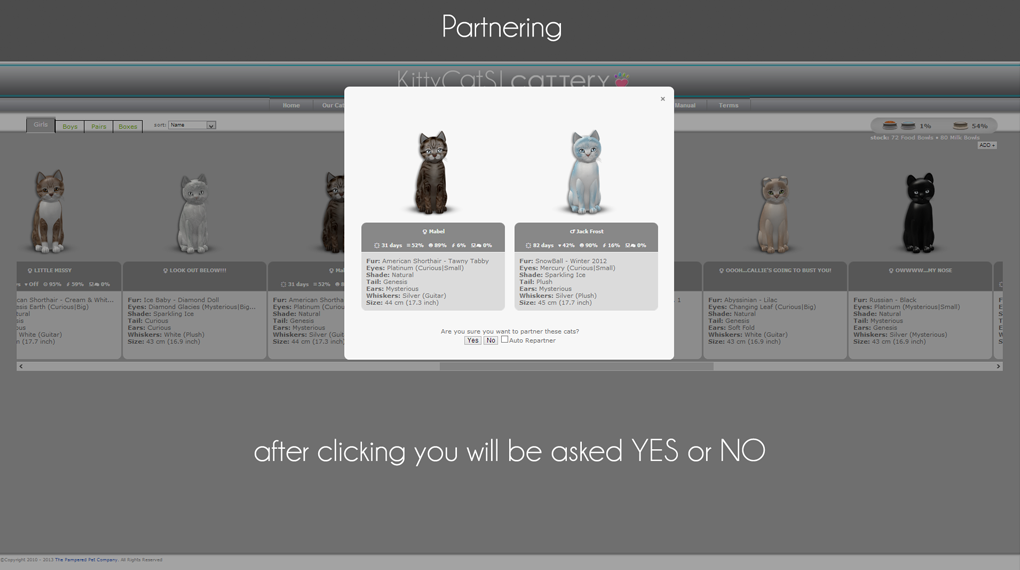
Once you’ve confirmed the partnership, the screen will change to show you the Pairs section. If you have cats in the Cattery that are partnered (even if the partner is not in the Cattery) they will appear in this section.

Partnered cats will be next to each other, and if the cat’s partner is not in the cattery, you’ll see a white silhouette in place of their partner.
So I know you’re thinking, “This sounds awesome! How can I access the Cattery?” First, you need to be registered. Registration for the KittyCats website is easy and only takes a few steps:

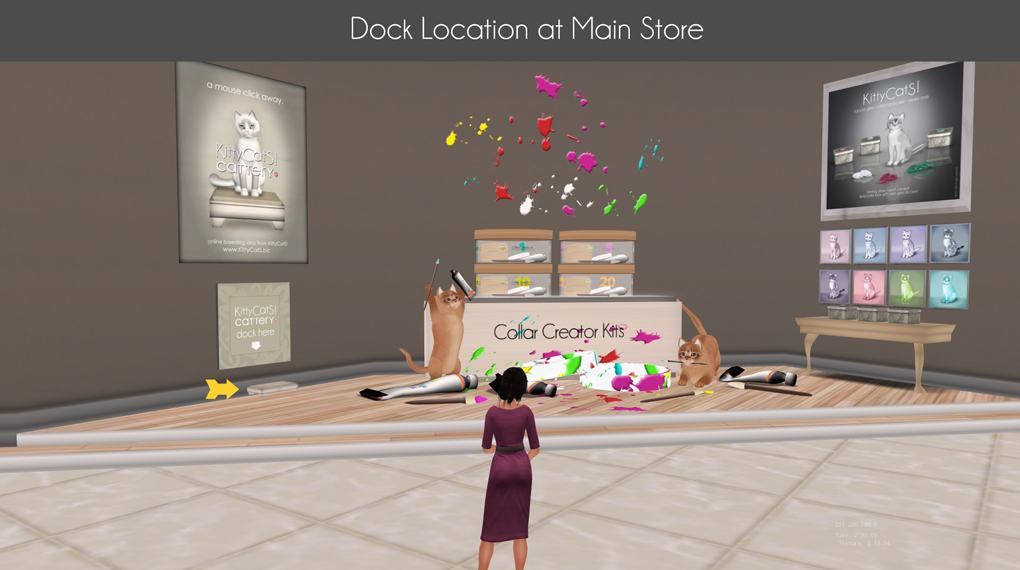
You can register for the website by clicking your cat and selecting Online Help from the cat’s menu, or by clicking a KittyCatS web terminal in world. Doing either will generate a popup with a weblink for you to click that will take you to the brief registration form. Fill that out and you’re all registered! You can even use a Cattery Dock to register. What is the Cattery Dock you ask? It’s the tool you’ll use to retrieve your cats from the Cattery. It can also be used as a means of purchasing Kitty Dollars to add to your Cattery account. To get the FREE Cattery Dock, visit the main store and pick it up in the lobby, next to the Custom Collar Kit display.
Once you have your dock, take it home and rez it on the ground. You’ll immediately get the following pop-up. DON’T PANIC! The Cattery Dock won’t steal your Lindens! This is a default message from SL whenever you rez an item that can be used as a vendor, or that can have Lindens paid into it.
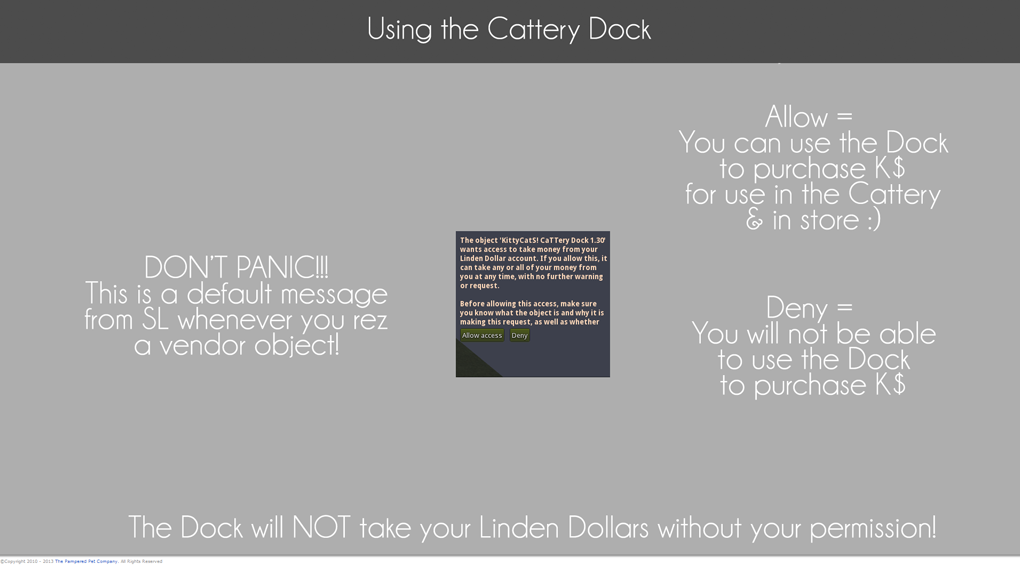
By clicking “Allow”, you’ll be able to use the Cattery Dock to purchase Kitty Dollars for use in your Cattery or in our main store. Clicking “Deny” just means you can’t use the Dock as a vendor. Either way, you’ll still be able to use the Dock to retrieve cats back into SL. If you do allow the Dock to be used as a vendor, it will not take your Lindens without permission. So let’s assume you’re going to click “Allow”. Now you can use your dock to purchase Kitty Dollars! And doing that is easy.

Just click on the Dock, select “Add K$”, and then select the amount of Linden dollars you want to spend. Remember that 1L = 2.5 K$. So if you spend 100L, you’ll get 250 K$. You’ll hear the familiar “ca-ching!” as you purchase your Kitty Dollars, and the menu will flash to reflect the new amount. Now let’s get some cats into your Cattery! Click on your cat for the menu and select Cattery, then follow the menu prompts to send your cat to the Cattery. Your cat will disappear from in-world and show up in the Cattery the next time you acess or refresh the page.

When you’re ready to bring your cats out of the Cattery, click on the Dock and select Cat to SL on the menu, then go to the weblink it gives you.

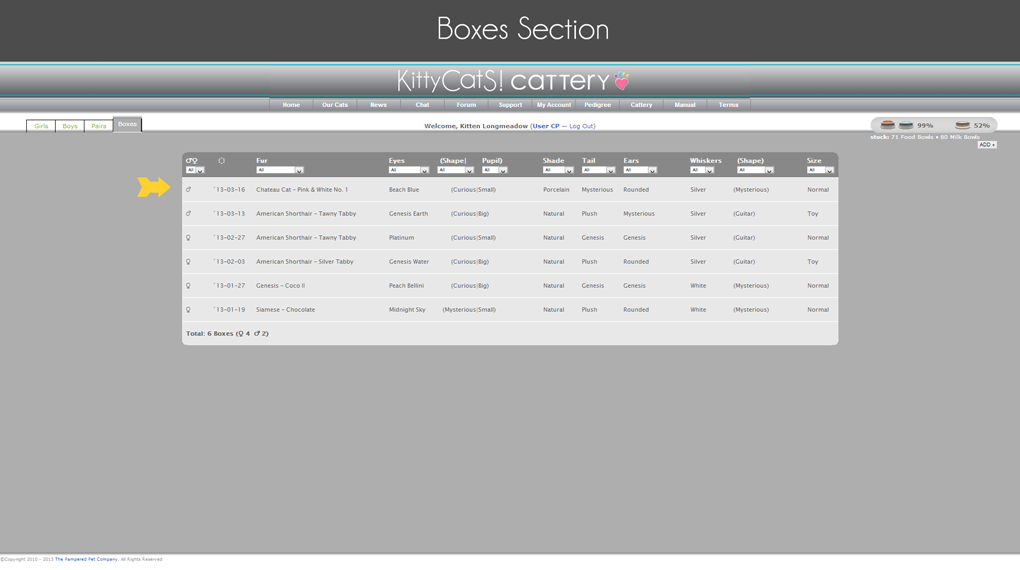
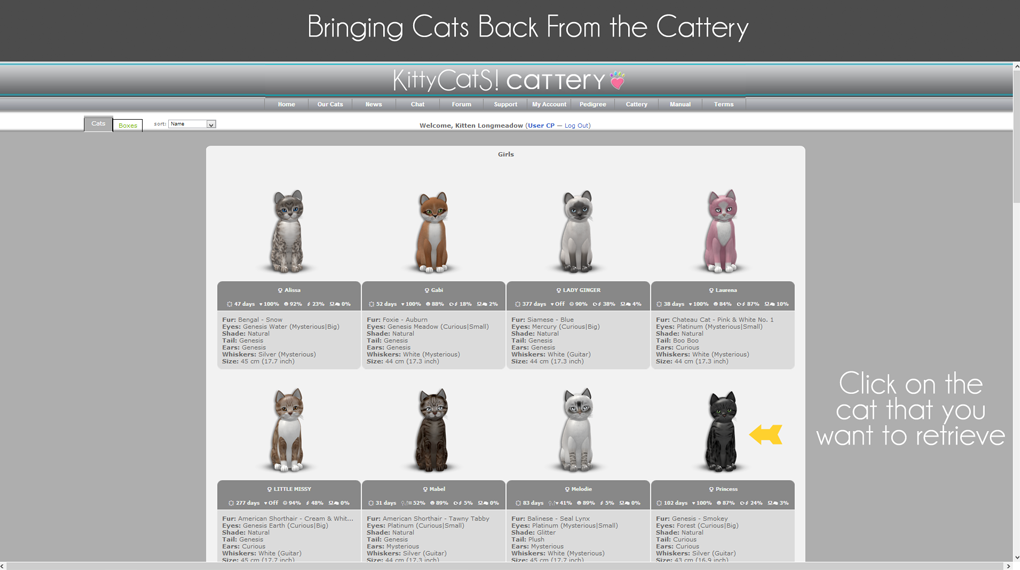
The link should take you to a webpage that looks like this. Find the cat that you want to retrieve and click on it. It will disappear from the page and should rez on top of the Dock within Second Life.
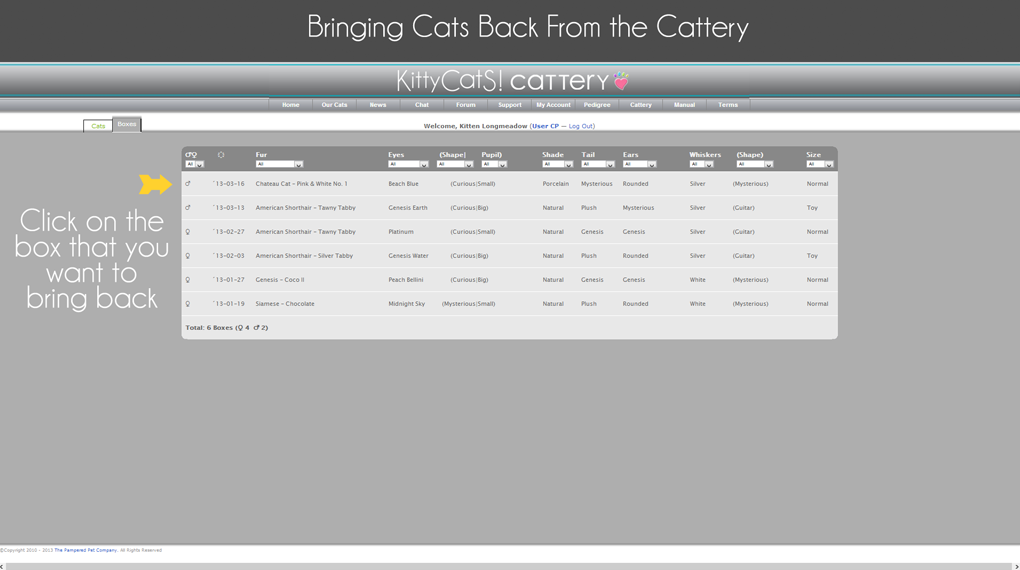
And if it’s a box you want to retrieve, click the Boxes tab at the top of the page to get the list of boxes in your Cattery. Find your box on the list, click on it, and it will disappear from the webpage and should rez on your Dock in Second Life.
Questions from the Q&A (paraphrased)
I was able to give a Love vitamin to a cat that was already at 100%. Is this a bug?
– Yes! This was a bug caught during our Q&A on the Cattery. KittyCats Resident, our scripter, was able to fix the bug within moments of being notified.
What if my Dock is not working? I can’t seem to get kitties out of the Cattery.
– First make sure you’re using the “Cat to SL” weblink and not the “Visit Cattery” weblink (the two pages look very different!) Next, try re-rezzing the Dock. Make sure it is set to the same group as the land and that you have enough prims available. Try taking it to a different location as well and see if it works there. If it’s still not working, pick up a new Dock from the store and try using that. If all that fails, file a support ticket with staff for assistance. And keep trying! The problem may be as simple as SL not playing nicely with the Cattery and it just needs time to sort itself out.
Thank you so much I have been waiting patiently for this
I love that you posted this on your blog. It has been long over do. I enjoyed attending the Q&A the other day at the KittyCatS! main sim. I think this will help lots of new breeders. Thanks again for taking the time to type this up and post it. GREAT work!
Having only 117 prims maximum on my shared plot, the use of the cattery is an invaluable method of exploring Kitty Cats and their traits, without the problem of worrying about prim usage. Thank you for this excellent feature. It is invaluable.
Super Kitten, Thank You so much, for the effort and detail You put into making our breeding as enjoyable as it can be!